Change requests
Most people at a firm may not edit a client record, and should not. They still know things the data does not: a client has started trading under a new name, a registered address has moved. Datum's answer is not to refuse them, because a person who is refused keeps a spreadsheet instead, and a spreadsheet is a source system nobody registered. Their edit becomes a change request, a proposal that waits in a queue until a steward approves or rejects it. The record does not change until then.
This page is the steward's half of that exchange.
How a request arrives
A fee earner opens a record, chooses Propose a change, edits the fields and submits with a reason. They are told plainly that it is a proposal: A steward will approve or reject it, and the record is not altered until they do. While the request is open, a steward sees a Change pending approval marker in the record's header (the fee earner who proposed it does not, because reading the list of requests needs the steward privilege), and the request starts a Change approval workflow that raises a review task for you.
A fee earner can also propose a new record, for a client or party that no source system holds yet. Nothing is created until you approve.
The queue
Choose Work, then Change requests. The count beside the title is the number of requests waiting.
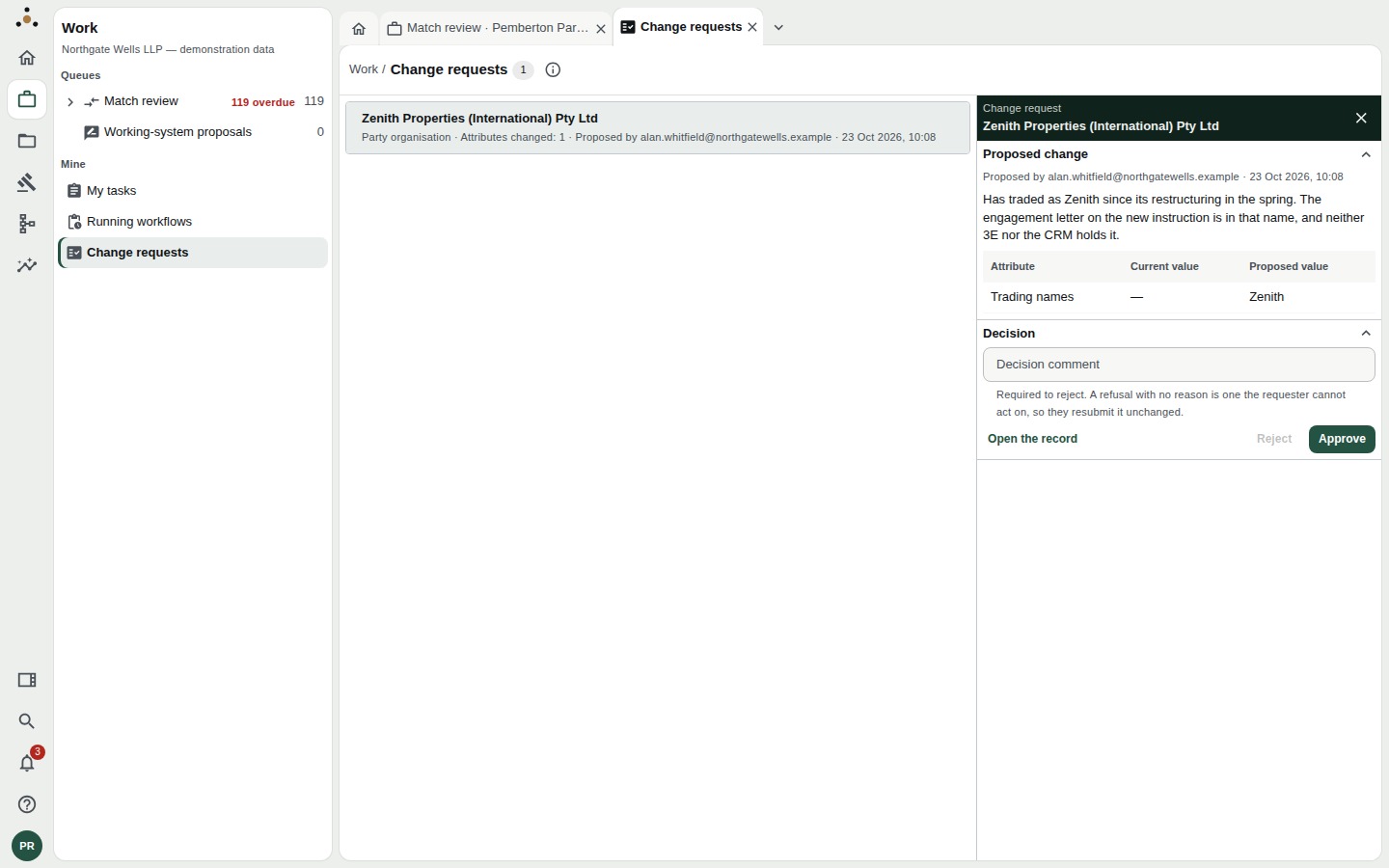
One request waiting. The list is on the left, the open request on the right.
Each row gives the record, its type, Attributes changed: N, who proposed it and when. If you proposed it yourself, the row says Proposed by you.
If a request is for a record you cannot read, the row says A record you cannot read rather than naming it. You cannot decide a request you cannot see the subject of.
Read the request
The panel opens with Proposed change.
- Who and when, and the requester's own words: in the example, Has traded as Zenith since its restructuring in the spring. The engagement letter on the new instruction is in that name, and neither 3E nor the CRM holds it.
- The change table: one row per attribute, with Current value and Proposed value. A proposal that empties a value shows Removes the value.
- Open the record takes you to the record itself, with its history and sources, so you can see whether the proposal is sensible.
What to check
Before approving, ask:
- Is it true? The requester's reason may be enough, or you may need to look at the record's sources. A trading name on an engagement letter is good evidence; a hunch is not.
- Is it the right field? A new trading name belongs in Trading names, not in Legal name. Changing the legal name of a client changes who the firm says it acts for.
- Is it already there? The current value column shows whether a source has since caught up.
- Does it conflict with a source? A value the firm's systems of record will overwrite on the next load will not stay changed. Say so in your decision.
Decide
At the foot of the panel is Decision, with a Decision comment box and two buttons.
Approve
Press Approve. A confirmation opens that says exactly what will happen.
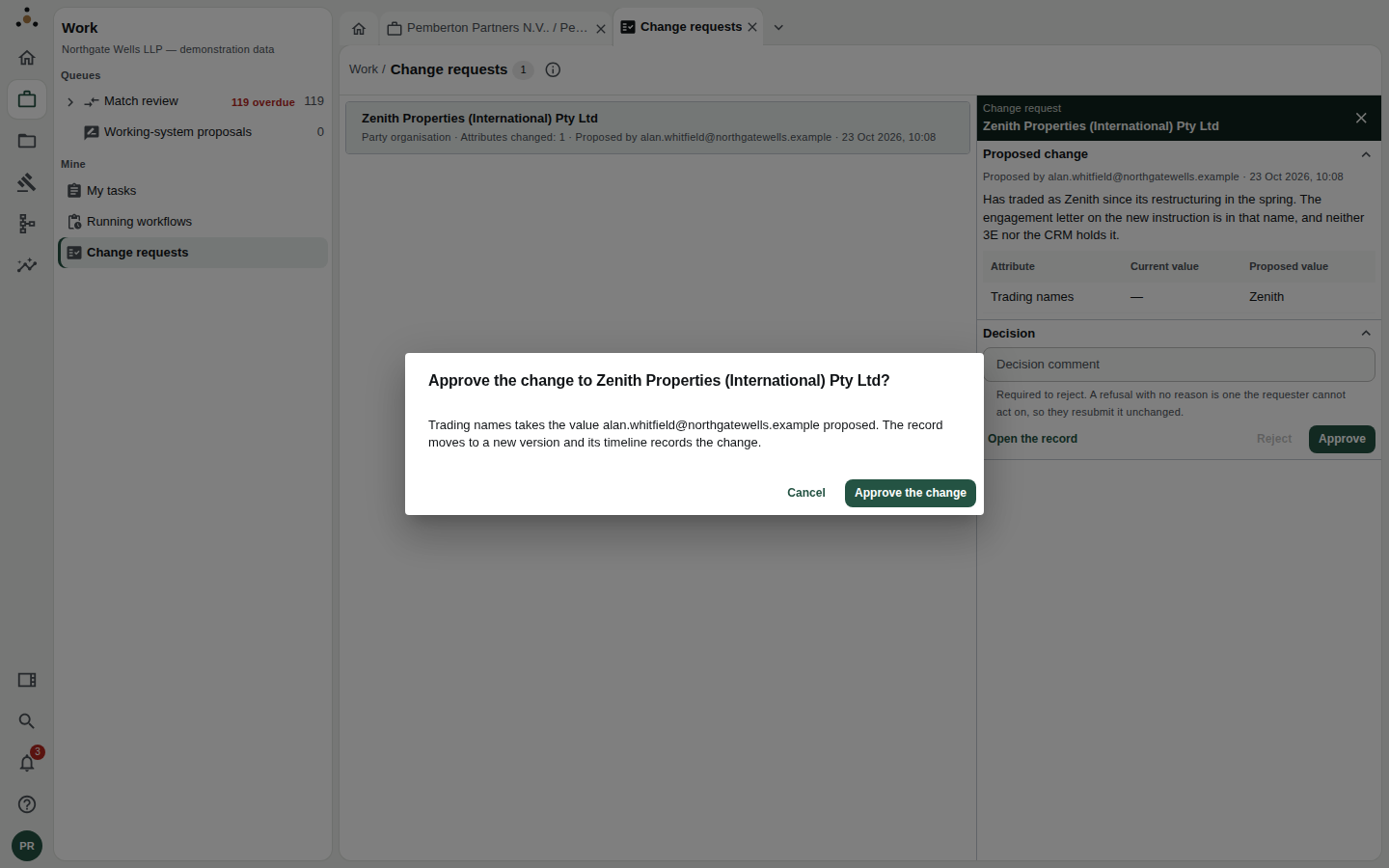
The confirmation. For a new record it says the record is created with these values; for a change it says the record moves to a new version.
Press Approve the change. The change is applied, the record moves to a new version, its timeline records who proposed it and who approved it, and the review task and the workflow close. The requester is notified. You are told Approved: the change to [record] and left on the list to choose the next request.
A comment is optional when approving.
Reject
Write a Decision comment first; Reject stays disabled until you do.
A refusal with no reason is one the requester cannot act on, so they resubmit it unchanged. The comment is what the requester reads. "No" costs both of you another round. "The CRM already holds this as a former name; please propose it under Former names" costs neither.
Rejecting leaves the record exactly as it was. The refused proposal is kept: the record's History shows it as a Proposal not applied, with who asked, what they asked for and why it was refused.
You cannot decide your own request
If you propose a change yourself, because the record is yours to edit but you chose to propose it, the panel says You proposed this change, so approving or rejecting it is somebody else's decision. Approve and Reject are not offered. If you no longer want it, Withdraw it:
- the request leaves the queue and nothing is applied,
- the record's History keeps the withdrawal, and any comment you give.
This is the same separation that stops an author approving their own working-system proposal: the second pair of eyes is the control.
If someone else decides first
A request can be decided in another tab or by another steward while you read it. The next action then tells you This change request was already approved elsewhere, so it has left the list, and nothing is applied twice.
What a steward does not need a request for
A steward edits directly. They do not propose; they save. See Editing a record, including how a steward's own change is recorded and reversed.
Good practice
- Clear this queue daily. Alongside overdue tasks it is the work someone else is visibly waiting on.
- Approve small, specific changes quickly. Hold the ambiguous ones, with a comment that asks the question.
- Use the reason. The decision comment is part of the record's explanation a year later. Write for that reader.