Key concepts
Nine ideas explain almost everything you will see in Datum. Each is short.
Golden record, source records and the master identifier
Your firm's systems each hold their own record of, say, a client — a row in the billing system, another in the CRM. Those are source records. Datum reads them and, where several describe the same real-world thing, builds one golden record: the single version everybody should rely on.
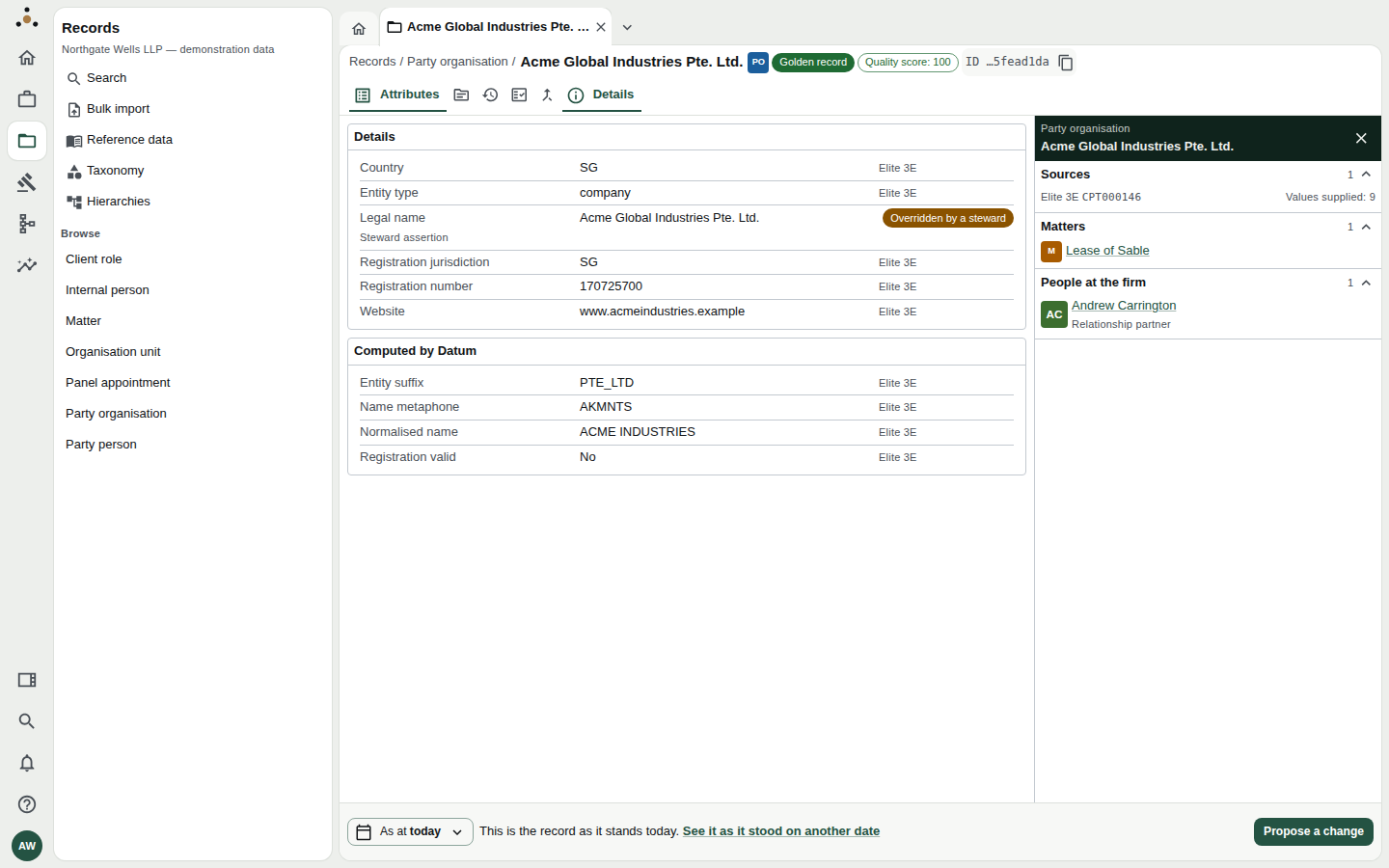
A golden record. The Golden record badge is in the header; each value carries a small tag naming the system it came from (here Elite 3E).
Every golden record has a permanent master identifier, shown in the header as ID (click to copy). It does not change when the record's name does. If two golden records are later merged, the retired identifier is never reused: anything that holds the old one is redirected to the survivor, and Datum tells you so rather than saying the record is gone.
The same company can be a client, an adverse party and a related party at different times. So Datum holds the company once, as a party organisation, and separately holds a client role — the firm's relationship with it, carrying the client identifier. See What Datum is.
Matching and merging
Datum compares records across systems and gives each pair a match probability. Three zones result:
| Zone | What happens |
|---|---|
| At or above the automatic-merge threshold | Merged without a person |
| In the review band | Sent to a data steward, who confirms, rejects or defers |
| Below the review band | Treated as different and not shown |
The thresholds are deliberately conservative, so the review queue starts large and shrinks as stewards decide pairs. A merge can be reversed. See Match review and Match thresholds.
Survivorship: which value wins
When merged source records disagree — one spells a name differently, one has a newer address — a survivorship rule chooses, attribute by attribute, which value the golden record shows. Rules may prefer the most trusted system, the most recent value, and so on.
You can always ask why this value? On a record, click the source tag beside a value to see the value chosen, the rule that chose it, how far the sources agree, the other values offered, and the source column it came from. See Reading a record.
A steward can pin a value to override the rules — permanently, until a source changes its value, or until a date — and must give a reason. A pinned value is marked Overridden by a steward. See Survivorship and Editing a record.
Two timelines
Every record is stored on two timelines (the technical word is bitemporal):
| Timeline | The question it answers | Label on screen |
|---|---|---|
| Valid time | When was this true in the world? | Valid on |
| Recorded time | When did the firm know it? | As recorded on |
They differ whenever a mistake is found later. If the firm learns today that a client changed its name last March, the valid date is last March but the recorded date is today. Both beliefs are kept: that is what lets the firm answer, years later, "what did we know when we gave that advice?" A change that corrects an earlier belief is labelled Correction in the record's history.
You use the two timelines through As at at the foot of every record — see Reading a record.
Walls and privileges
Datum limits what you see in two quite different ways. Keeping them apart avoids most confusion.
| Ethical wall | Privilege | |
|---|---|---|
| Removes | A whole record (and everything that exists only through it) | A field on a record you can otherwise read |
| Set by | A wall raised on a client relationship, by an administrator and a second approver | Your role's attribute permissions |
| What you see | Nothing. The record is not found — not "denied" | The record, with the field named as withheld |
| Applies to | One person, or a group, named on the wall | Everyone holding the role |
A wall answers "may this person know this relationship exists?". A privilege answers "may this role read this attribute?". Details: What you cannot see.
A platform administrator holds a role that administers the platform and reads none of the firm's records. This is deliberate and it is checkable on the Roles and access screen. See Roles and access.
Records you can access
Every list, count and total in Datum counts only the records you can access, and says so in the same line on every screen:
Results and totals include only records you can access.
That line is there on every list — not only when something has been held back — because a notice that appeared only when records were hidden would itself reveal that they were. For the same reason there is no "6 records withheld" figure anywhere: a count of what was held back is itself the disclosure the wall exists to prevent.
Two colleagues can legitimately see different totals for the same list, and neither is wrong. If you need a number that is complete for the firm, ask somebody whose access covers it — and remember that you cannot tell from your own screen whether yours does.
Proposals and approvals
Where you may not edit a record directly, your edit becomes a proposal (a change request). It does not alter the record. A data steward reads it, and approves or rejects it — a rejection needs a reason. You are notified either way. The person who proposed a change never decides it. See Proposing a change.
Queues, tasks and workflows
Work that needs a person is gathered into queues (for example, pairs awaiting a match decision) and tasks (steps in a workflow — a defined sequence such as Matter intake or Change approval). Items carry a due date; one past due shows SLA breached or Overdue. See Daily routine and Workflows.
Datum is not a conflicts system
Datum masters the party data a conflicts process relies on. It never issues, stores or returns a clearance decision. A record being found, merged, walled or verified is not a statement that any matter is or is not in conflict. See What Datum is.