People and access
Administration → People and access shows who has used Datum, what the firm's directory said about them, and what that let them do. It is also where you change which role a directory group confers.
You can see who signed in and which roles they held. You cannot see the clients or matters they read. Administration is a role, not a bypass.
There is no user list — on purpose
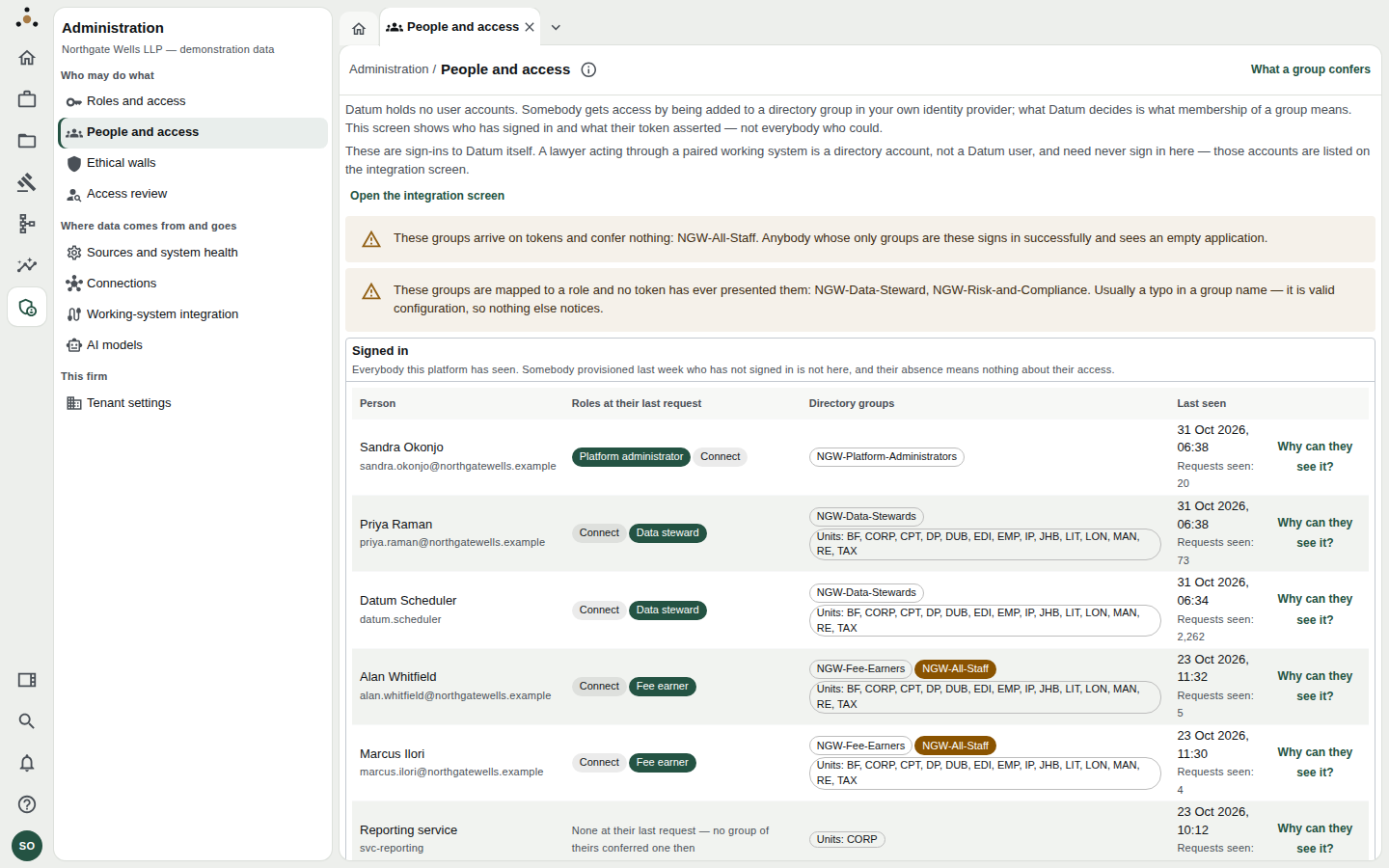
The top of the screen explains the model; warnings call out groups that confer nothing or have never been seen.
Datum holds no user accounts. Somebody gets access by being added to a directory group in your own identity provider, and Datum decides what membership of that group means. So this screen shows who has signed in and what their token asserted — not everybody who could.
A person provisioned last week who has not yet signed in is therefore not on this list, and their absence tells you nothing about their access.
A lawyer acting through a paired working system (such as Trovato) is a directory account, not a Datum user, and need never sign in to Datum. Those accounts are listed on the integration screen; use the Open the integration screen link at the top.
The Signed in table
| Column | Meaning |
|---|---|
| Person | Name and sign-in identifier. Service accounts are labelled as such. |
| Roles at their last request | The roles their groups conferred the last time they made a request. A person with None at their last request reached Datum but their groups conferred nothing. |
| Directory groups | Every group on their token. Office and practice units are shown as Units: BF, CORP, …. |
| Last seen | Last request time and Requests seen. |
| Why can they see it? | Opens Access review for that person. |
The two warnings
At the top you may see one or both of these:
- Groups that arrive on tokens and confer nothing — for example
NGW-All-Staff. Anybody whose only groups are these signs in successfully and sees an empty application. This is the commonest reason for "I can log in but there's nothing there" — usually a new joiner whose practice-group membership has not been added yet. - Groups that are mapped to a role but no token has ever presented them — for example
NGW-Data-Steward(singular) when the directory sendsNGW-Data-Stewards. Usually a typo in a group name. It is valid configuration, so nothing else notices.
When somebody reports an empty application, find them in the Signed in table. If Roles at their last request is empty, they are missing a group. If they are not in the table at all, they have never reached Datum.
What each group confers
Scroll to the Directory groups section, or choose What a group confers at the top right.
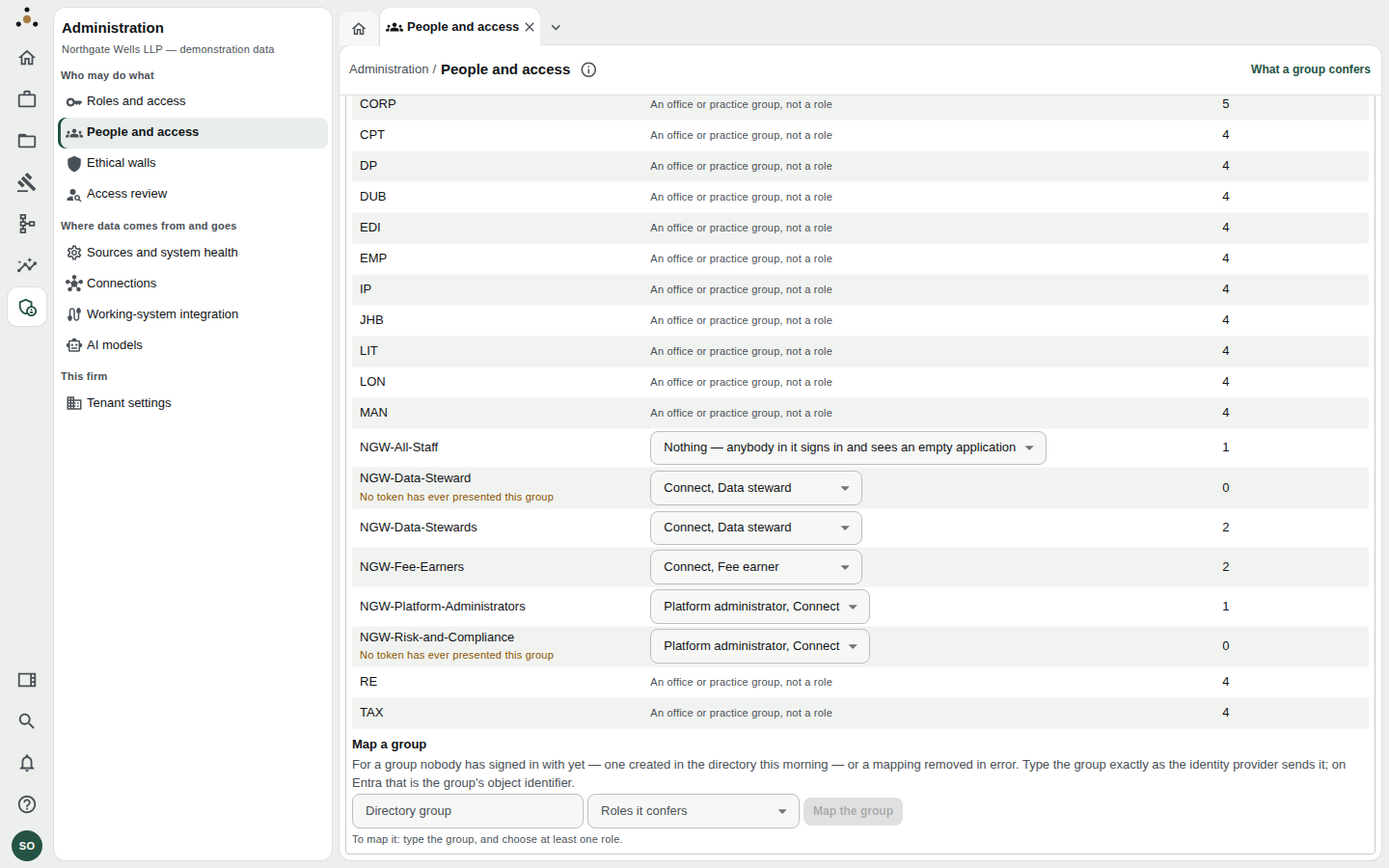
Each row is a group a token has presented or the mapping names. Office and practice units (CORP, LON…) are labelled An office or practice group, not a role. The right-hand number is how many people have been seen with that group.
To change what a group confers
- In the Confers column, open the dropdown beside the group and tick the roles it should confer.
- Choose Save what group confers.
- Read the confirmation. It says: From their next request, everybody in the group holds these roles — including members who have… — naming the effect before you commit.
- Confirm. The change takes effect on each person's next request; nobody needs to sign out.
To map a group nobody has used yet
Use Map a group at the foot of the table — for a group created in the directory this morning, or a mapping removed in error.
- Type the Directory group exactly as the identity provider sends it. On Microsoft Entra that is the group's object identifier.
- Choose the Roles it confers (at least one).
- Choose Map the group.
A group name that differs by one character from the directory's is a different group. After mapping, return to this screen once someone from the group has signed in and confirm the group's count of people seen rises above zero.
To stop a group conferring anything
Open its dropdown, clear every role and save. The confirmation then reads that everybody in the group will hold nothing. They keep signing in and see an empty application.
Service accounts
A downstream consumer (for example the reporting service) signs in with a client-credentials token, which belongs to no directory. Its entitlement is on the token itself, so it appears under Service accounts with the scopes and roles it presented rather than groups.
Related
- Roles and access — what each role means.
- Access review — explain one person's access.
- Two-person approvals