Dashboards
Insight › Dashboards answers the question a managing partner or head of legal operations asks: is the data getting better, and is the team keeping up? It brings together a quality score, the work waiting, and the rules being broken.
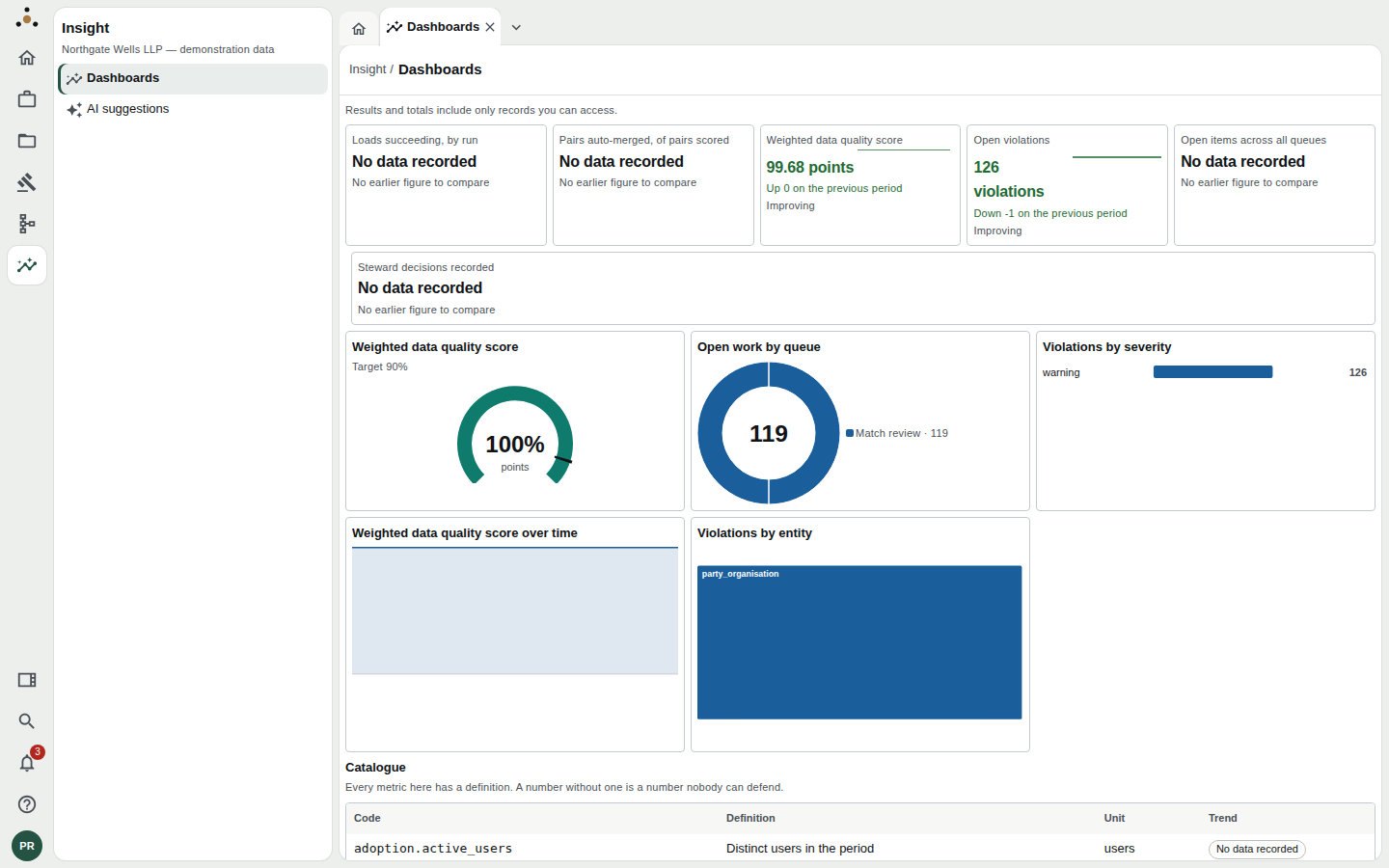
The dashboard in the demonstration firm.
Under the page title, every dashboard says "Results and totals include only records you can access." The queues and violations are counted over the records your own session may read, so two people can see different figures. This is deliberate: a count of what was held back would itself reveal that something is held back.
Headline tiles
The tiles across the top are the numbers worth quoting. Each carries:
- The figure and its unit (points, violations, users).
- A direction against the previous period: Improving, Worsening, Unchanged, or No earlier figure to compare. Improving takes account of which way is good: fewer open violations is an improvement, a higher quality score is an improvement.
- A small sparkline where there is history.
The demonstration firm shows: Loads succeeding, by run; Pairs auto-merged, of pairs scored; the Weighted data quality score; Open violations; Open items across all queues; and Steward decisions recorded.
A tile that says No data recorded means nothing has ever written that metric, not that its value is nought. A dashboard that drew both the same way would hide its own gaps, so this one does not. Likewise, if the platform refuses a read (for example, an administrator, who holds no right to read the firm's records, cannot be shown queue counts), the chart says the read was refused and quotes the reason, instead of claiming there is no work.
The charts
| Chart | Reads as |
|---|---|
| Weighted data quality score (gauge) | The overall score against its target, shown beneath the title (for example Target 90%). The score weights violations by importance, so one severe problem counts for more than many trivial ones. |
| Open work by queue (donut) | How much is waiting in each steward queue. The total is in the middle. |
| Violations by severity | How many open rule violations there are at each severity. If there are none, the chart says "No open violations on the records you can read." |
| Violations by entity (treemap) | Where the violations are concentrated. Bigger blocks mean more. |
| Weighted data quality score over time | The trend, with the target marked. |
Every chart is drawn from a table of values which is available to screen readers, so nothing depends on colour alone.
A quality score of 82% is not actionable. 82% against a 90% target, beside the queue it is worst in and the entity violations cluster in, is. Read the gauge, then the treemap, then the donut.
The catalogue
Scroll to the foot of the page for the Catalogue: every metric the platform records, with its Code (for example dq.score), its Definition, its Unit and its Trend.
Every metric here has a definition. A number without one is a number nobody can defend. Before quoting a figure to a client, a regulator or a board, look it up here.
The catalogue is a flat list of defined metrics, which this guide sorts into five families:
| Family | Metrics |
|---|---|
| Operational | Loads succeeding, by run; pairs auto-merged, of pairs scored; true pairs reaching merge or queue; open items across all queues; age of the oldest open item; 95th percentile API latency; rule evaluations passing. |
| Quality | Weighted data quality score; open violations. |
| Stewardship | Steward decisions recorded; median time from queue entry to decision; median age of open items. |
| Adoption | Distinct users in the period; searches run; record views; distinct API clients. |
| Scale | Records under management; registered source systems. |
Quality evidence for a single record
The dashboard is the firm-wide view. For one record, open it and use its Scorecard: the quality findings the record has, and what each costs it. A record starts at 100 and loses 10 points for each open error, 3 for each warning and 1 for each advisory. Only open findings count, so a finding a steward has accepted as an exception or suppressed no longer lowers the score.
Who can see it
Anyone with a role that reads records sees the full dashboard. An administrator sees only the metrics that need no record access, and the charts that would need it say so.