Attributes and forms
Model › Attributes and forms is where a firm extends the model it was given. It is the editable counterpart of the read-only diagram. Pick an entity in the Entity menu at the top and the screen shows two things: the entity's attributes, and the form people use to enter its records.
The one rule: the platform's attributes are fixed
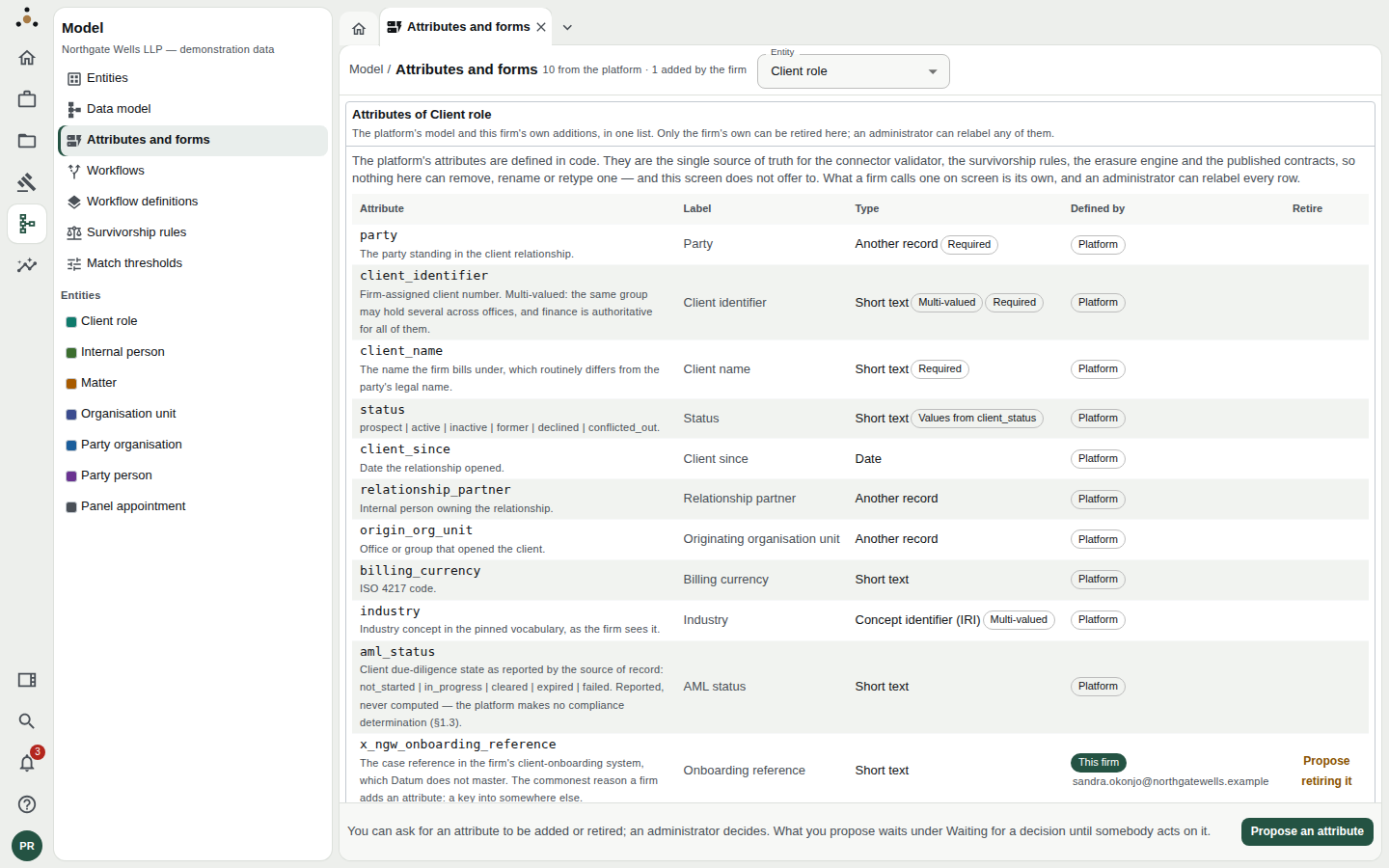
Attributes of Client role, as a data steward sees them. Platform attributes show the badge Platform; the firm's own show This firm.
Every attribute ships in one of two ways:
- Platform attributes are defined in code. They are the single source of truth for connector validation, survivorship rules, the erasure engine and the contracts published to downstream systems. Nothing on this screen can remove, rename or retype one, and the screen does not offer to.
- This firm attributes are the firm's own additions. Their names carry your firm code, so a later platform release that adds an attribute of the same name cannot collide with one you added years earlier. In the demonstration firm the prefix is
x_ngw_.
The list shows, for each attribute: its stored name and description, its label (what people see), its type with badges such as Required, Multi-valued or Values from client_status, and who defined it.
Who can do what
| Action | Data steward | Administrator |
|---|---|---|
| Read the attributes and forms | Yes | Yes |
| Propose a new attribute or propose retiring one | Yes | — |
| Add an attribute directly, retire a firm attribute | No | Yes |
| Approve, reject a proposal | No | Yes |
| Relabel any attribute or entity | No | Yes |
| Arrange a form | No | Yes |
| Preview a form | Yes | Yes |
Approving a model change applies it to every form, export and downstream contract on that entity. That is why it is never the asker's to apply. A steward without the administration class sees Propose where an administrator sees Add, and the screen says so: "You can ask for an attribute to be added or retired; an administrator decides."
Proposing an attribute (data steward)
Choose Propose an attribute.
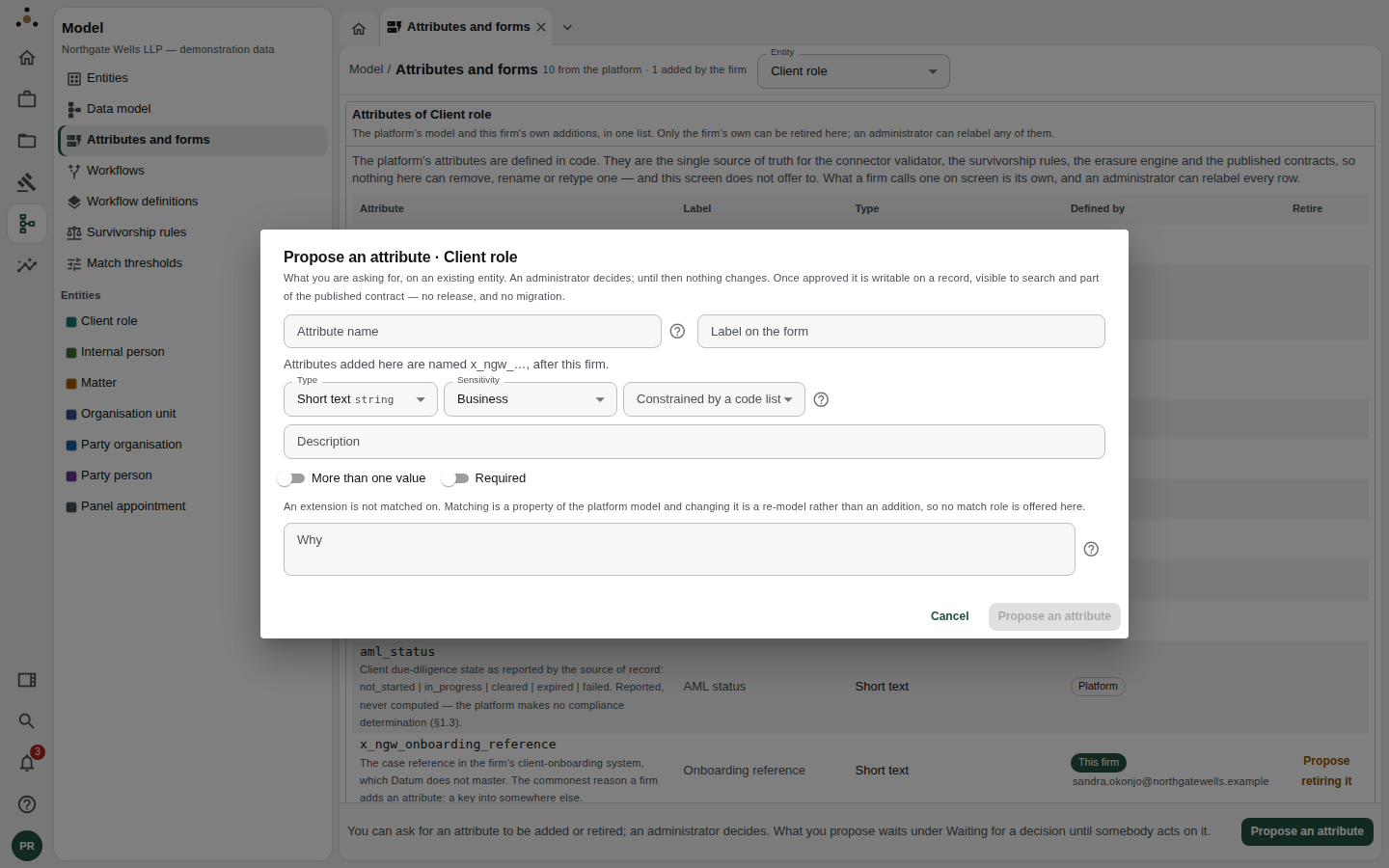
The proposal dialog. Nothing changes until an administrator decides.
| Field | What to enter |
|---|---|
| Attribute name | Lower case, words separated by underscores. No prefix — the screen adds your firm's. A line beneath shows how it will be stored (for example x_ngw_...). |
| Label on the form | The wording people will see. |
| Type | Short text, Long text, Whole number, Decimal number, Yes / no, Date, Date and time, Concept identifier (IRI), Another record, or Structured value. |
| Sensitivity | Public, Business, Personal or Special category. Choose according to who should be allowed to see it. |
| Constrained by a code list | Optional; see below. Only available for text types. |
| Description | What the attribute holds. |
| More than one value | Switch on if a record can hold several, such as several email addresses. |
| Required | Switch on if every record must have one. A required attribute needs a default value, otherwise every existing record would become invalid the moment it is registered. |
| Why | What the attribute is for. The person deciding has only this, so be specific. |
Choose Propose an attribute. The request waits under Waiting for a decision, and you can Withdraw it while it is waiting.
The administrator deciding may never have heard of the matter that prompted it. "Needed" is not a reason; "Conflicts team needs to record the onboarding reference from the new client system, which Datum does not master" is.
An attribute you add is not matched on. Matching is a property of the platform model, and changing it is a re-model rather than an addition, so no match role is offered.
Adding an attribute (administrator)
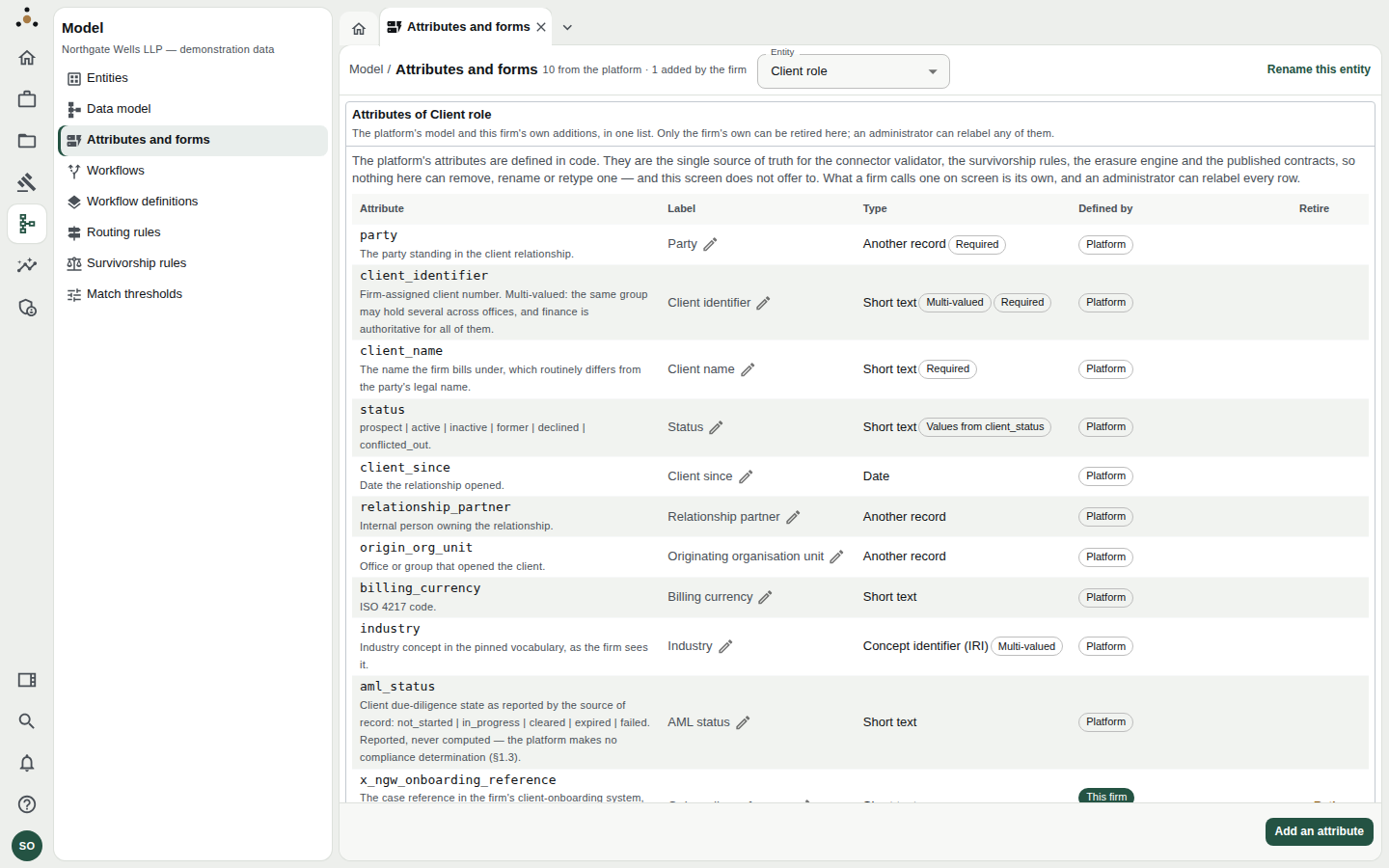
The administrator's view adds pencil icons beside every label, Rename this entity, and Add an attribute.
Choose Add an attribute. The dialog is the same as the proposal, with one difference: the first time, you are asked for a Firm code, a short code for the firm, asked once. Every attribute you add carries it.
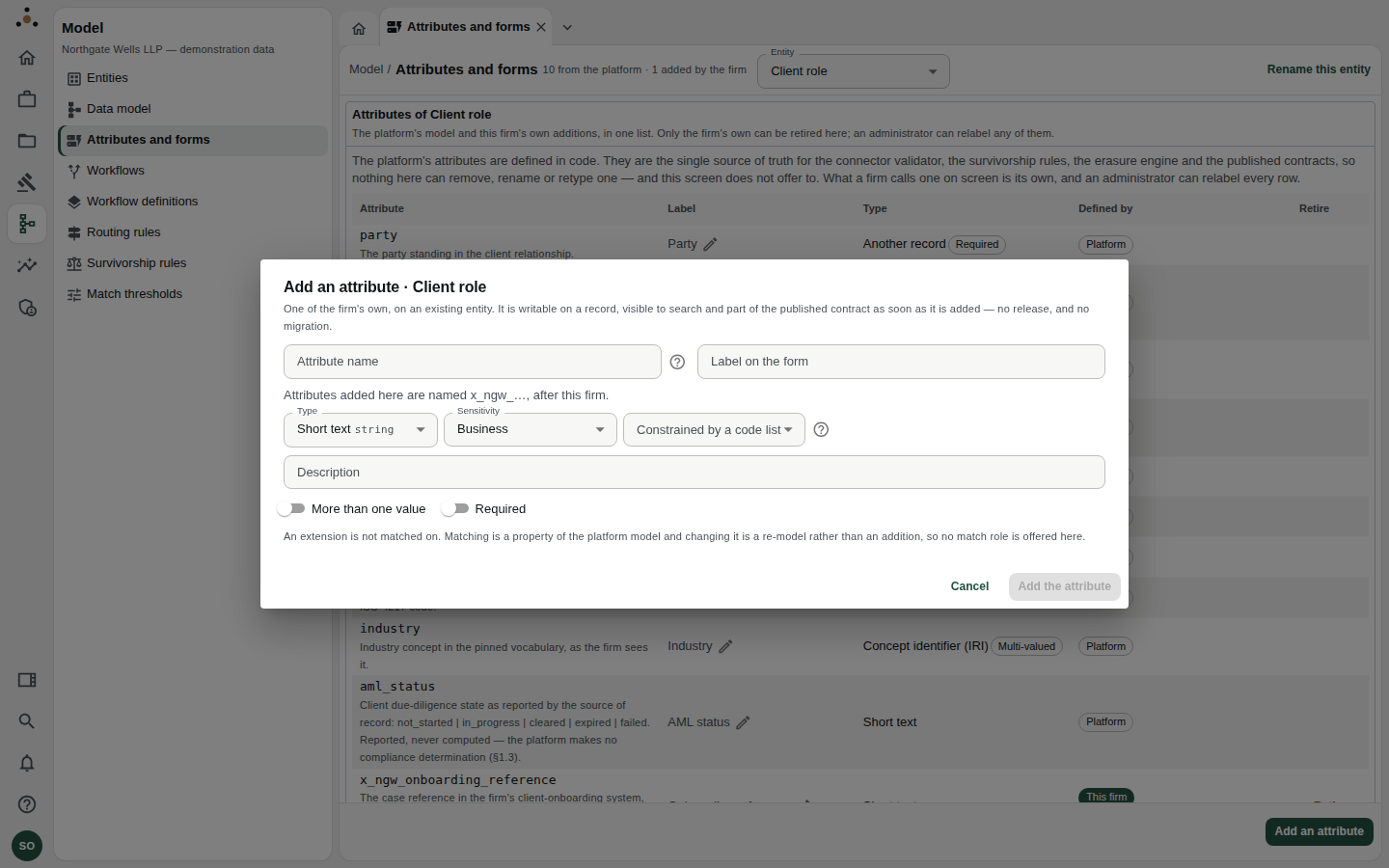
Adding an attribute directly.
Choose Add the attribute. It is writable on a record, visible to search and part of the published contract at once: no release and no migration.
Approving or rejecting a proposal
Proposals appear under Waiting for a decision, showing who asked, what they asked, and why. Choose Approve (and confirm with Approve the change) or Reject. You may add a Note on the decision, recorded against whichever request you decide next.
Retiring an attribute
Choose Retire beside a firm attribute and confirm. Retiring takes the attribute off every form and out of the schema.
The values stay on the records that carry them. An attribute name that nothing can label, classify or mask would be worse than one nobody uses. Adding the attribute back makes those values meaningful again.
If the platform cannot read a stored definition, the screen tells you which one is withheld from every form and every read until it is retired. Its values stay on the records.
Binding a field to a code list
Some fields should only ever hold values from an agreed list: a matter's status, a client's status, a billing arrangement. A field can name the code list it draws from (ADR-0063). Each field names at most one list; one list can serve several fields.
On the attribute list this appears as a badge, such as Values from client_status. Wherever that field is entered, people choose from the list instead of typing, and a value outside the list is refused.
When you add a firm attribute, use Constrained by a code list to pick the list. The choice is limited to text fields: prose, concept identifiers, numbers, dates and yes/no values cannot be bound.
Platform attributes cannot take a binding through this dialog. The firm's model configuration declares them, because the attribute is the platform's and the binding is the firm's. If a field that should be a list shows a plain text box, tell your administrator.
Relabelling: what people are shown
An administrator can change what any attribute, or an entity, is called on screen. Choose the pencil beside a label, or Rename this entity.
A label is a caption, not a name. The stored name does not change, and neither connectors, contracts, survivorship rules nor erasure ever see the label. Choose Use the platform's wording to go back.
The form
The lower half of the screen is the entity's entry form.
- Preview the form shows it as someone entering a record would see it, as your role sees it. Required fields carry an asterisk, multi-valued fields say Can hold several values, and list-bound fields say Choose from…. Nothing typed in a preview is saved.
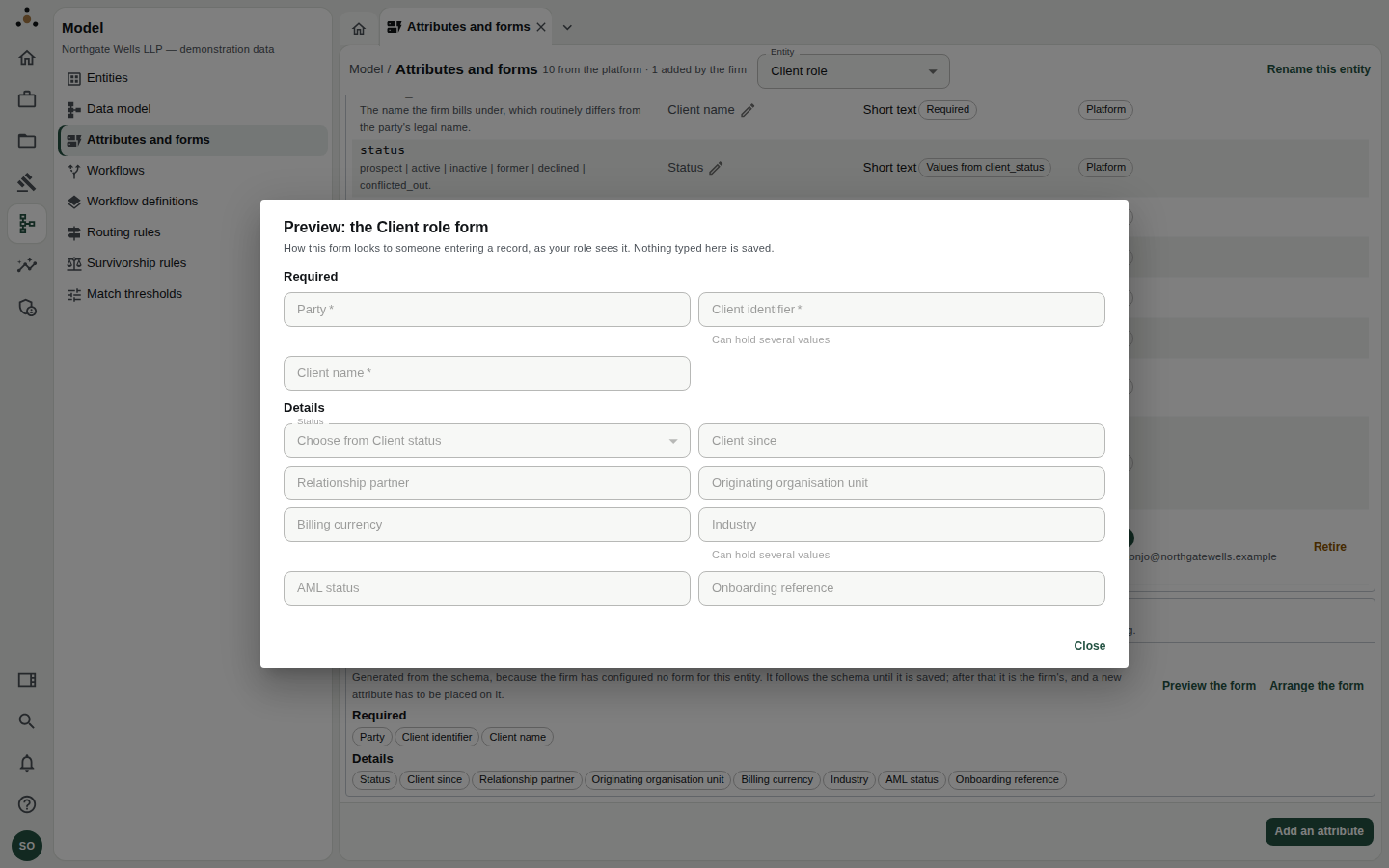
Previewing the Client role form.
- Arrange the form (administrators) opens the form editor.
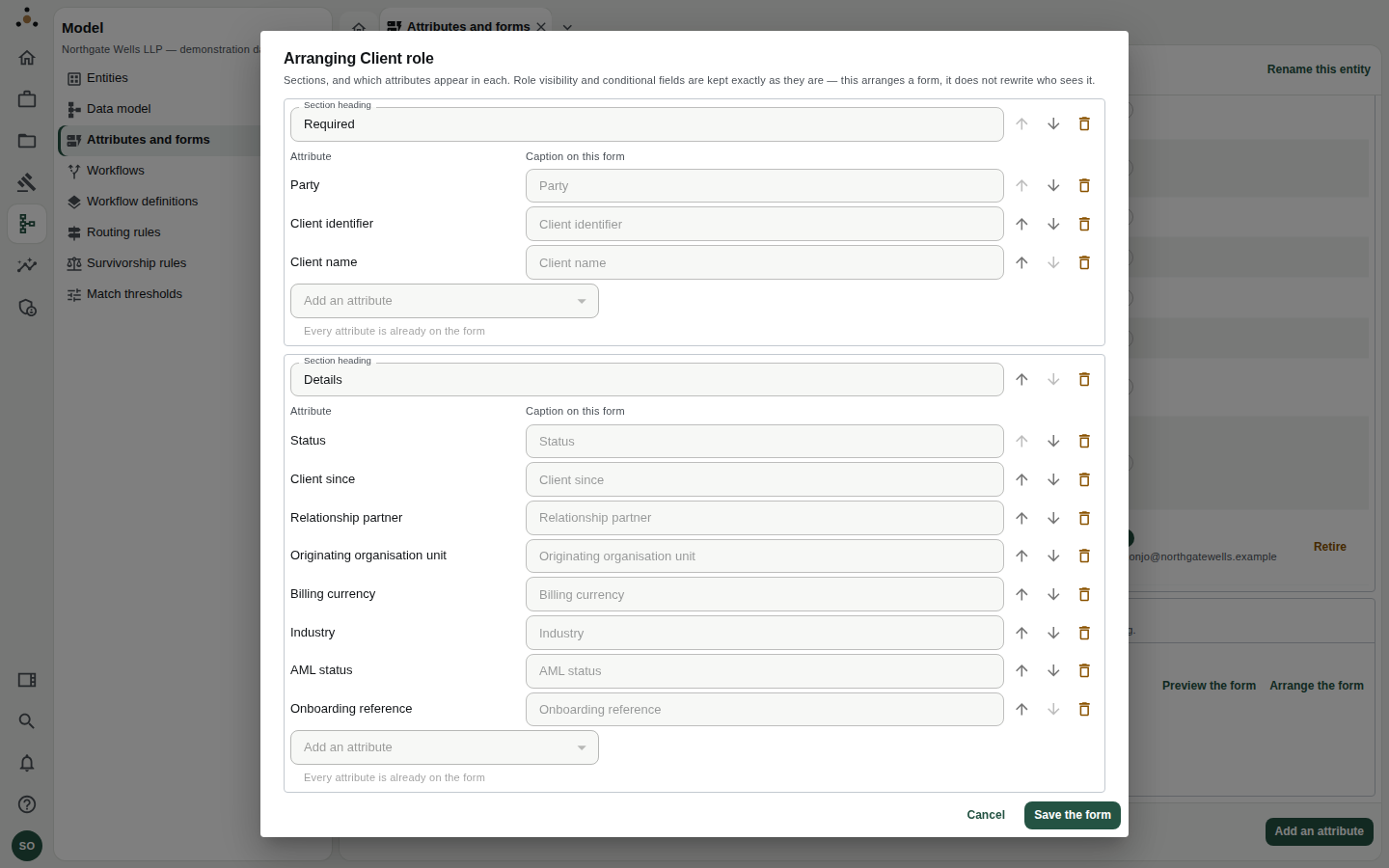
Arranging a form: sections, their order, and which attributes appear in each.
In the editor you can rename a section heading, move a section or an attribute up or down, take an attribute off the form, add one from Add an attribute, set a caption on this form, and add a new section. Choose Save the form to keep it.
Role visibility and conditional fields are kept exactly as they are. Arranging a form does not rewrite who sees what. Sections shown to some roles only are marked so that moving or removing one is a decision, not an accident.
Until a firm saves a form, it is generated from the schema and follows it. Once saved, it belongs to the firm, and a new attribute has to be placed on it by hand. A saved form shows its version, for example Version 3, configured by the firm.
If a form cannot be read in full it is not opened for editing; saving a partial copy would delete the sections it does not contain.
Field guidance in forms
Optional guidance sits behind a Help button beside a field, never as hover text. Activate it with the mouse or keyboard, read it, and press Esc to close; focus returns to the button. Errors and warnings stay visible without opening anything.
If you cannot see the controls
"Adding and retiring an attribute needs the administration endpoint class, which this session does not hold. The list is readable either way." This is not a fault. Your roles do not include administration. Use Propose instead, or ask an administrator.